

How to Order Furniture Online
Finding the right furniture for your classroom, library, or learning space should be easy – and with our online store, it is! Buying online makes selecting, ordering, and receiving furniture simple and stress-free. Here’s how to get started.
Step 1: Browse Our Education Furniture
Explore our wide range of classroom, library, and collaborative learning furniture:
You can browse by category – desks, chairs, tables, storage, or library shelving.
Search for specific items using the search bar.
Check product details – dimensions, materials, colours, and features – to ensure the furniture fits your space and needs.

Step 2: Add Items to Your Cart
Once you’ve found the perfect furniture:
Select the quantity you need.
Click “Add to Cart.”
Keep shopping or click the cart icon to review your selections.

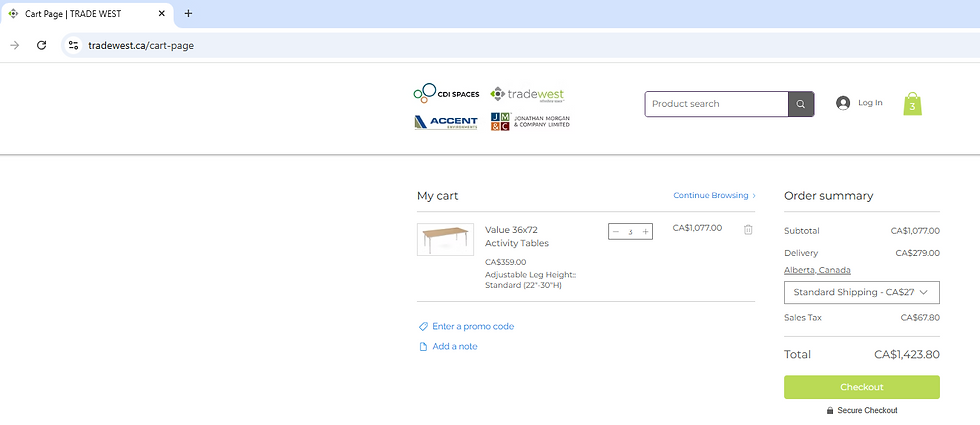
Step 3: Review Your Cart
Before checking out, confirm:
Quantities of each item.
Product specifications.
Any notes about delivery.
Step 4: Checkout Process
To complete your order:
Enter your shipping address.
Select your payment method – all major credit cards and secure payment options are accepted.
To pay with a purchase order (PO), select ‘Offline Payment’ at checkout.

Step 5: Place Your Order
Click “Place Order” and you’ll get:
A confirmation email with your order details
Our online store makes it simple to outfit your classrooms, libraries, and learning spaces with quality furniture that lasts. Shop Online.


Comments